

Contact customer service, or search UBox on Facebook to get the referral code.
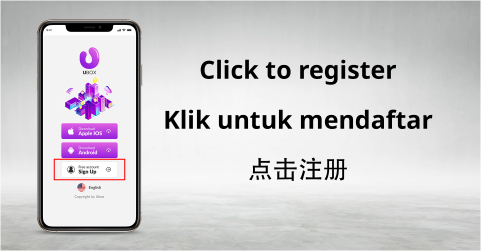
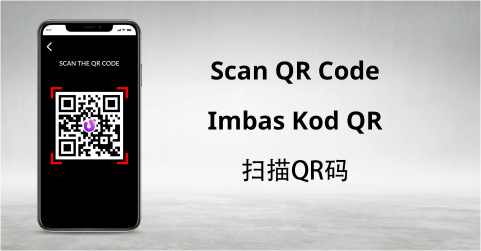
Scan the referral code or open the referral link to register
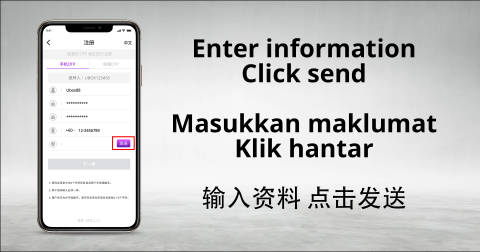
The UID is the account username used for logging into the UBOX app. Upon entering the registration page, you are required to create a new login ID and set a password. The UID only allows alphanumerics, and the first character must start with a letter (a-z). The length required is between 6 to 16 characters (E.g., abc888 or a1b2c3). The password must also be between 6 to 16 digits, consisting of either all numbers or a mix of letters and numbers (E.g., 123888 or abc123).
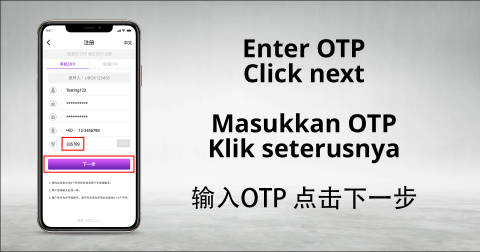
Once you have completed setting your UID and Password, proceed to fill in your mobile phone number or email address to receive the verification code. Once all the above steps are completed, CONGRATULATIONS, you have successfully created your own UBOX Account!
As a globally renowned online gaming company, we boast a team of world-class game information experts, along with helpful and experienced customer service representatives. Our professional marketing team ensures that our customers can enjoy their gaming experience in a safe and secure environment. Additionally, our state-of-the-art technical team is constantly improving to guarantee the best possible gaming experience for our users.
















 CN
CN
 EN
EN BM
BM